
NSWS refers to the National Single Window System of the Government of India. NSWS portal facilitates the application, approval, and registration of various licenses and permissions required for investments and business setup in India.
- Identify the required pre-establishment and pre-operation approvals for setting up a business unit in India.
- Apply for the suggested approvals online.
- Store approval-related documents in a digital repository.
- Pay processing fees for various approvals.
- Track submitted applications and receive status updates.
- Renew approvals online, wherever applicable.
- Access information related to timelines, fees, and required documents.
Digital Signature for NSWS Portal
To take benefit of NSWS, a valid Digital Signature is required. A DSC ensures confirmation of the applicant’s authorization in the application process. Follow the steps below to register your DSC on the NSWS portal.
- Buy a Digital Signature for NSWS uses. Apicountry is an authorised RA to issue a valid DSC.
- Install DSC Token/Driver provided by Apicountry.
- Run the necessary connecting application from the NSWS portal.
- Open the Common Registration Form in the NSWS portal.
- Proceed to add Authorised Signatory Details with the correct PAN as in DSC.
- Click on the ‘Add’ button to register the DSC.
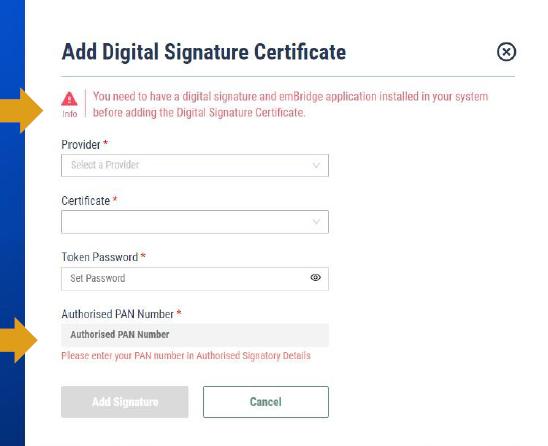
- On the next screen select Apicountry Token from the dropdown list ‘Provider’.
- Once the token is selected, DSC will be displayed in the ‘Certificate’ Field.
- Then enter the token password and click the ‘Add Signature’ button.
Important Note
Portal interfaces, DSC providers, and registration procedures may change over time. Therefore, users should always follow the latest instructions available on the NSWS portal.